
Category Archives: Power Pages

Display AI Summary for Custom Table in Power Pages
Do you want to display an AI-generated summary on a web page in Power Pages? If yes, this article will help you understand how to implement this feature step by step. Scenario Let’s consider an example. We have an Event table (a custom table) in Dataverse that we use in Power Pages. Our Power Pages website has an Event List… Read more »

Updating record using Custom Button Power Pages

Requirement Power Pages provides a flexible platform to build low-code, externally facing web applications on top of Dataverse. A common requirement in Power Pages applications is to perform operations on Dataverse records for example update a record using custom button. This is useful when we want to update related table record. In this blog, I’ll walk you through how to… Read more »

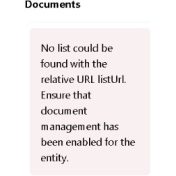
Fixing “No list could be found..” ERROR in Power Pages

Problem Recently while setting SharePoint integration in Power Pages we faced below issue. Solution Recently while setting up Document integration in Power Pages for Customer form, we configured all the actions required for the integration. SharePoint integration was already working fine in Sales app. After verifying configuration steps when tried to look in to Power Pages, we got above error…. Read more »